Any summary,
in your handwriting
Type a line, pick a real handwriting, and download a page that looks written by hand. No printer, no sign-up, about ten seconds.
or write your own line:
No printer, no account, nothing to install. Want it in your OWN handwriting? That is step 2, below.
Who is it for?
One engine, your handwriting. What changes is only what you write with it.
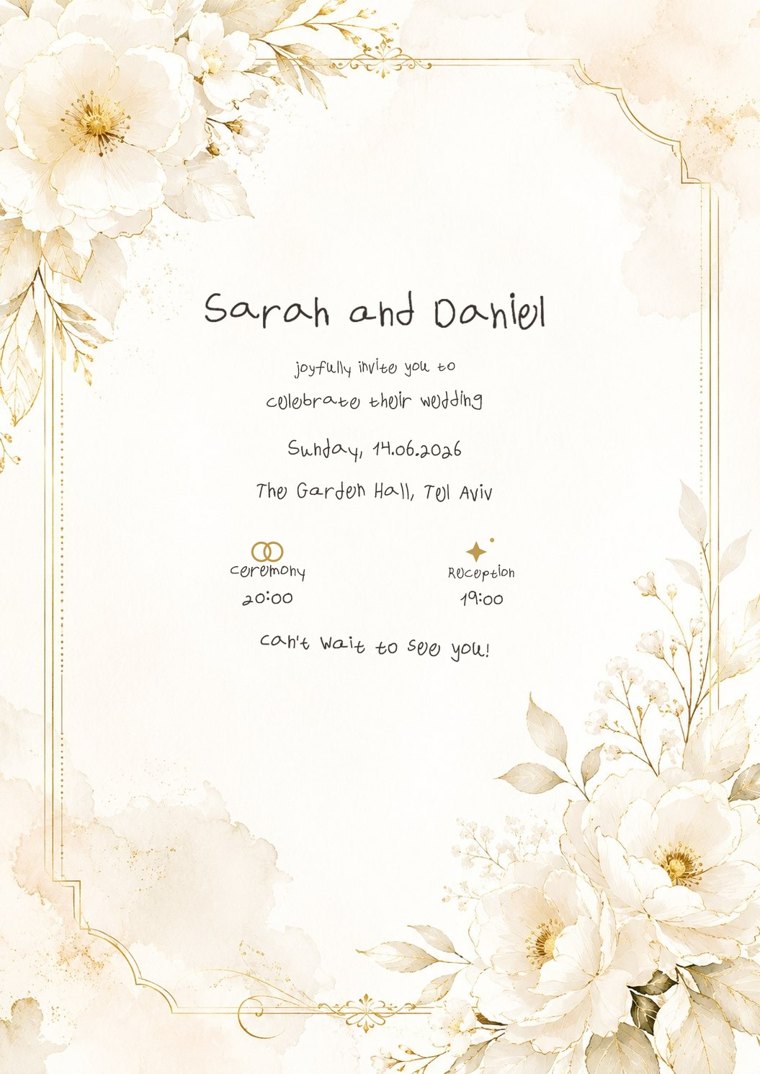 Made on Penmark · real handwriting
What no one else has
Other tools turn text into “handwriting”. No one gives you all four together:
Actually your handwriting
Start in one of dozens of ready-made hands, then capture your own letters from one filled template, and the page is literally your writing.
Real math
Stacked fractions, stretching radicals, exponents and indices, not a flat line of text.
Natural variation
Every letter is captured in several variants, so repeated words never look stamped from a font.
An editing studio
After rendering, tune everything: size, weight, spacing, per letter, even per occurrence, until it feels right.
Watch the full walkthrough
Every feature in under two minutes, from the template to your handwritten PDF.
Write something now
Pick a handwriting, type your text, download the page. No printer and no account. The writing area below opens the moment a hand is loaded.
Dozens of real handwriting styles. One click and everything you type is written in it.
Dozens of handwriting styles, free. Click one and your text comes out written in it right away. Capture your own hand later, and the page is literally your writing.
Pick a handwriting above, or tap anywhere here to try a sample hand.
How does it work? We prepare a ready-made message for the AI you pick, you paste it there, and come back here with the solution, and the page is written in your handwriting.
👁 Peek at the ready message
Quick format
{"t":"title","v":"Title"} · {"t":"num","v":"1"} · {"t":"k","v":"Given:"} · {"t":"kf","key":"Given:","f":"..."} · {"t":"f","v":"..."} · {"t":"fb","v":"..."} · {"t":"gap","v":24}.In a formula: fraction
FR{num}{den} · power ^{..} · subscript _{..}.Now make it your own handwriting
This is the one slow part, and you do it once.
- 1Print the template.
- 2Fill every cell on the pages you need with a dark pen (black or blue).
- 3Photograph or scan each page flat, with all 4 black corner squares in the frame.
A photo of your regular handwriting will not work, only the filled template does.
About 10-20 minutes in total. Every page you complete is picked up automatically. An empty cell is a character your font will not have.
Upload your filled template
Scan or photograph the pages and upload, whole or in parts. Every page is recognized automatically, so order doesn't matter.
We only collect the handwriting samples you upload and the text you ask us to write, and they are deleted from our server automatically within about 24 hours. If the handwriting belongs to a child, a parent or guardian should be the one uploading it. Privacy policy
Did you print the template and fill in every page by hand?
We can only read our printed template, filled in with your handwriting. A photo of other handwriting will not work.
Your handwriting, as captured
Questions & answers
What is Penmark?
Penmark is a free web tool that turns typed text into handwriting. Type a line, pick one of dozens of real handwriting styles, and download a page that looks hand-written, with no printer and no account. Fill in a short template once, writing each character a few times, and from then on any note, summary, assignment or solution is rendered as a PDF in your own handwriting, on real grid paper.
How do I convert typed text into my own handwriting?
Download the template, write each character by hand, then scan or photograph it and upload it. Penmark builds a library of your handwriting and renders any text you paste, including LaTeX math, as a handwritten PDF you can download.
Does it support Hebrew, English and math symbols?
Yes. Penmark handles Hebrew, English, digits, punctuation, Greek letters and math symbols, with real stacked fractions, superscripts and subscripts. There is a full Hebrew+English template and an English-only template.
Can it write my homework or solutions in my handwriting?
Yes. Paste any text, or paste a worked solution from an AI like ChatGPT, Gemini or Claude (in LaTeX or plain text), and Penmark renders it as a page in your own handwriting.
Is Penmark free?
Yes, it is free to use and runs in your browser. No account or install is required.
Do I need to re-upload my handwriting template every visit?
No. After the first build, your handwriting library is saved in your own browser (locally, not on our servers, where uploads are deleted within 24 hours). On your next visit it loads automatically, and you can replace it with a new one or delete it anytime.
What else can I write with it, besides homework?
Almost anything: personal letters, journals, wedding and event invitations, greeting cards, recipes, worksheets and feedback notes for teachers, and family keepsakes: have a parent or grandparent fill the template once, and new notes can be written in their handwriting forever.
Something broke, or something you wish was here? Tell us.