Handwritten lab report: the format, the formulas, and what to draw by hand
A lab report is the document where handwriting and math meet: prose, a few measurements, a handful of formulas with units, and a graph. That mix is exactly what trips up most converters, which handle the prose and mangle the rest. This guide goes section by section: what to write, how each piece renders in handwriting, and what to leave room for.
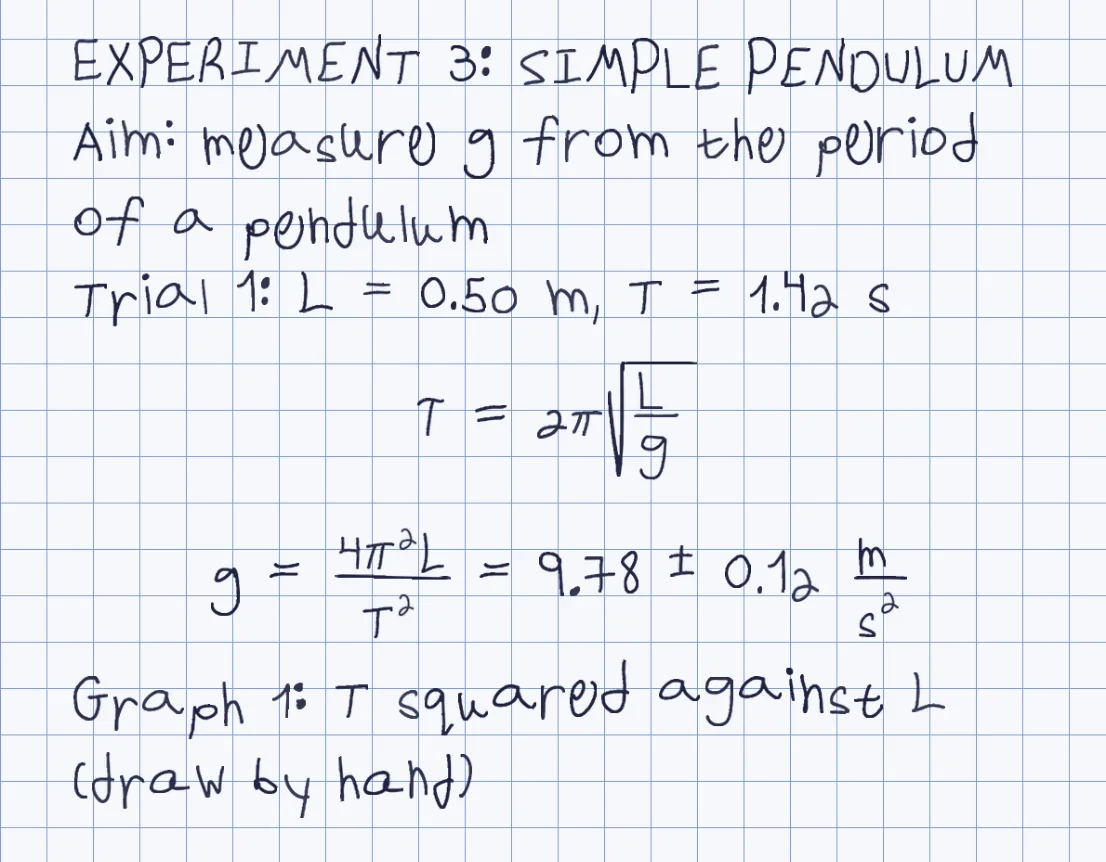
Prose and formulas together
Paste the whole report: the prose is written as lines, and each formula on its own line is built in two dimensions.
Units are formulas too
Write m/s^2 as a fraction with an exponent, and numbers with a plus or minus value come out as typed.
Tables and graphs are yours
They are not drawn. Write the data as lines, and draw the graph by hand on the printed page.
Your own hand
The template, about 10-20 minutes in total, once, so every report is in your letters.
How it works
- Write the report with each section heading in capitals on its own line, and each formula on its own line
- Put the data as plain lines, one trial per line, and add a line naming each graph you will draw
- Paste it into Penmark, choose grid paper, and read the note above the preview for anything left out
- Download the PDF, print it, and draw the graphs and tables by hand in the space you left
Try it free, a ready-made hand and a first page in seconds
The sections, and how each renders
Most lab reports follow one order: title, aim, materials, method, data, calculations, graph, error analysis and conclusion. Prose sections are plain lines: write the title and the section names in capitals on their own lines, the method as short numbered steps with the numbers typed, and the conclusion as a short paragraph. Because the engine writes plain lines, the structure lives in the typing.
Data is where a table would normally go, and tables are not drawn. Write one trial per line instead, as in Trial 1: L = 0.50 m, T = 1.42 s, repeated for each trial. Spaces inside a line are fine, but do not rely on aligning columns with them. Calculations are formula lines, each on its own line.
Formulas and units that come out right
Paste LaTeX or type exponents with ^ and indices with _; the engine recognises a formula line and lays it out. A formula such as T = 2π√(L/g) comes out with the radical bar stretched over the whole fraction, and units come out as formulas too: a result with a plus-or-minus uncertainty and a unit written as metres over seconds squared renders as a stacked fraction with an exponent, as in the figure. Greek letters such as Δ, θ, λ and π, the plus-or-minus sign and the degree sign are all in the template.
A formula inside a sentence is pulled onto its own centered line, so write displayed formulas on their own lines and keep running text plain. In prose, write chemical formulas plainly, H2O with an ordinary 2; for a displayed equation put it on its own line in LaTeX. Scientific notation works in a formula line, as in 3.0 \times 10^{8}. The full list of what is drawn and what is left out is in the LaTeX to handwriting guide: vectors with arrows and bars over symbols are not drawn.
What to draw by hand, and how to leave room
Graphs, sketches of the apparatus and ruled data tables are drawn by hand on the printed page, which is what most lab courses expect anyway. The catch is leaving room. Blank lines did not add vertical space in our test, so putting empty lines in the text will not open a gap. Add a line that names the graph, render the page, and then drag the lines below it down in the editor to make the space, or put each graph on its own printed sheet.
Grid paper in the tool gives the look of a lab notebook and keeps symbols lined up. If your course asks for graph paper for the graph itself, print that sheet separately and draw on it.
Length, and your own hand
About 100 words fill a page at the default size, and each displayed formula takes two or three lines of height, so a typical four-page report is about 250 to 300 words of prose plus its formulas at the default size, a little more at a smaller one. Paste up to 300,000 characters, and tune size, stroke weight and spacing after rendering, for the whole page or for a single symbol that landed badly.
The report comes out in a ready-made hand at once, and in your own after you fill the template, about 10-20 minutes in total, once. The wider math story is on the handwritten math page, and for a full assignment the handwritten assignment page goes through it step by step.
Questions & answers
Can I write a whole lab report with formulas in handwriting?
Yes. Paste the prose and the formulas together, each formula on its own line. Fractions, roots, exponents, Greek letters and units are drawn in your handwriting.
Are tables and graphs drawn?
No. Write the data as one line per trial and draw the graph by hand on the printed page. Blank lines do not add space, so drag lines down in the editor to leave room.
How do I write units like m/s squared?
As a formula on its own line, for example a fraction of m over s with an exponent 2. It is stacked in two dimensions. In running text write the unit plainly.
Can I paste LaTeX from my report?
Yes. Commands such as vectors with arrows, bars over symbols, cases and align environments are not drawn; the page lists what it left out, and the LaTeX guide has the full list.
How do I write chemical formulas?
In running text write them plainly, H2O with an ordinary 2. For a displayed equation, put it on its own line in LaTeX so the indices are lowered.
How many pages will my report be?
About 100 words fill a page at the default size, and each displayed formula takes two or three lines, so a four-page report is roughly 250 to 300 words plus its formulas.
Try it free, a ready-made hand and a first page in seconds
Penmark in numbers
- Price
- Free, no account
- Characters captured
- 155 in one template: Hebrew with final letters, English, digits, punctuation, math symbols and Greek
- Time to set up
- About 10-20 minutes in total, once. Or skip it: 91 ready-made hands work immediately
- Variations per character
- Three, from the three times you write each character
- Languages
- Hebrew and English in one sentence, plus math. No niqqud, Hindi, Arabic or Cyrillic
- Output
- PDF, Word (docx) or PNG on lined, grid, dotted or blank paper
- Privacy
- Uploads deleted within about 24 hours; your library stays in your browser
- Not included
- No installable font file, no tables or graphs, no OCR of scans