Text to handwriting PDF: paste the text, download the pages
You have the text and you need a PDF that looks written by hand: a school submission, a letter to print, a page for a notebook. It is a simple job once you know what the PDF actually is, how much fits on a page, and which of the three common routes gives a result that does not look stamped.
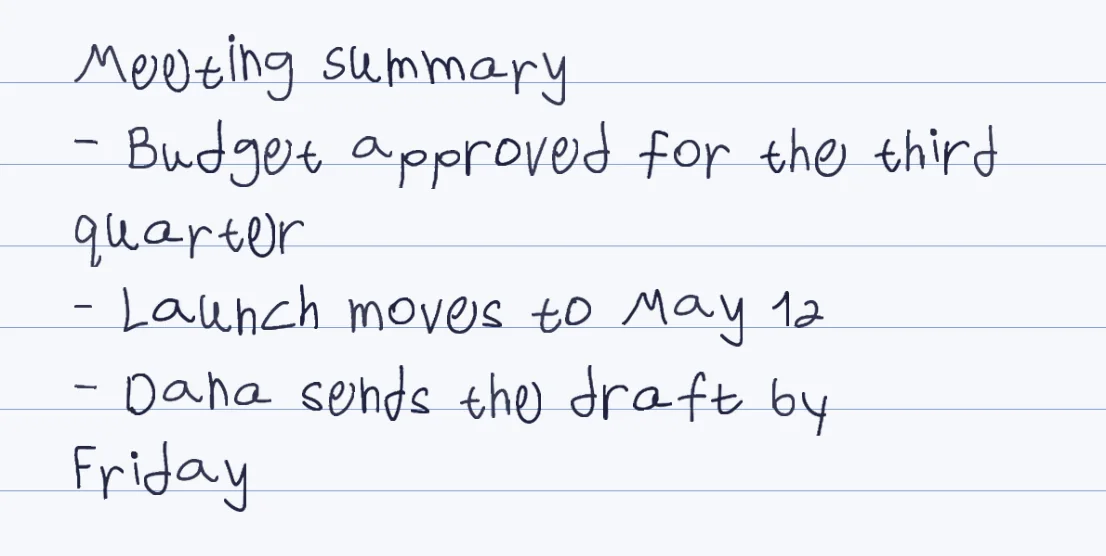
One image per page
The PDF holds page images of about 0.7 MB each, 216 by 283 mm. Printing is exact, selecting text is not.
About 100 words a page
At the default size with the sample hand. A smaller size fits roughly 110 to 130; the exact count depends on the hand and the paper.
Free, no account
No watermark, no charge per page, nothing to install.
Ready-made or your own
91 ready-made hands work at once. Your own hand takes one template, about 10-20 minutes in total, once.
Three ways to get a handwritten PDF
| Route | What you get | Time | Where it falls short |
|---|---|---|---|
| Print a web page set in a handwriting font | A PDF with real, selectable text in a font | About a minute | Every letter repeats one identical shape, which is why it looks printed |
| A preset-style generator | Page images in a stock handwriting style | Under a minute | Everyone who picks the style gets the same letters, and it is never your own hand |
| Penmark with a ready-made hand | Page images, with variation between letters | Seconds | It is not your own writing |
| Penmark with your own hand | Page images in your letters, three variations of each | 10-20 minutes in total, once, then seconds | Needs the filled template; a photo of ordinary handwriting does not work |
How it works
- Open the tool and press the try-now button: it loads a ready-made hand with nothing to print
- Paste your text, or upload a PDF, Word or txt file up to 20 MB
- Choose lined, grid, dotted or blank paper, and tune size and spacing until the page looks right
- Download the PDF, or Word or PNG pages if you prefer, and print at 100 percent
Try it free, a ready-made hand and a first page in seconds
What is actually inside the PDF
Each page is one image of ink on paper. There is no text layer under it, so you cannot select, copy or search the words in the finished PDF, and a screen reader will find nothing to read. Keep your typed original for anything that has to stay searchable or accessible, and treat the handwritten PDF as the copy for printing and sending.
The page is 216 by 283 mm, a little taller than US Letter and shorter than A4. A page weighs about 0.7 MB, so a ten-page document is around 7 MB: fine for email, but worth a glance at the limit if you are uploading it to a form. On an A4 printer choose fit to page, a reduction of under 3 percent, so the edge of the ruling is not clipped.
How much fits on a page
At the default size with the sample hand, about 80 to 120 words fill a page, depending on word length (we measured short-word text at about 120 a page and longer prose at about 80, on lined, grid and blank paper). Setting the size to 0.8 brings that to roughly 110 to 130 words a page, nine to eleven pages for the same text. A ready-made hand has its own letter proportions, so the count moves a little with the hand you pick.
That makes length easy to plan: a five-page assignment is about 500 words, an ordinary one-page letter is about 100 to 130. A single document can hold up to 300,000 characters and 600 paragraphs or lines; a longer text is better split into two documents. An uploaded PDF is read for its first 100 pages.
Three ways to get one, and when each is right
Printing a web page in a handwriting font is the quickest and the only one that keeps the text selectable, and it is the right call when the PDF is read on a screen and nobody will look closely. Up close, a font is the weak point: it has one shape per letter, so a repeated word is a stamp.
A preset-style generator is the quick route to a handwritten-looking page when any neat handwriting will do. Penmark is the route when the page has to be in a particular hand, in Hebrew, or has math in it, and the honest side-by-side is on the TextToHandwriting.com comparison. The longer story of the converter itself is on the text to handwriting page.
From your text to the PDF without surprises
Only the 155 characters of the template are drawn: Hebrew with final letters, English, digits, common punctuation and math symbols. Anything outside that set, such as @, &, #, $, * or an accented letter, is left blank, and the page lists the characters it skipped before you download. Curly quotes and long dashes are converted to the straight ones for you.
Formatting does not travel. Bold, italics, headings and bullets in a source file become ordinary lines, so type a hyphen for a bullet and a number for a numbered list yourself. A PDF you upload must have a text layer: a scan has none, and there is no OCR, so for a scan paste the text instead.
Printing it so it looks right
Print at 100 percent on A4 or Letter. If you want the page to look like a notebook, choose the lined or grid paper inside the tool so the ruling is part of the image and lines up with the writing; if you are printing on real lined paper, choose blank. The ink colour can be changed in the preview, and a dark blue or black reads most like a pen. Print a single page first and check the size before you print the whole document.
Questions & answers
Can I select or copy the text in the handwritten PDF?
No. Each page is an image of handwriting with no text layer behind it, so the words cannot be selected, copied or searched. Keep the typed original for that.
How many words fit on a page?
About 100 at the default size with the sample hand, and roughly 110 to 130 at size 0.8. It varies a little with the hand and the paper you choose.
How long can the document be?
You can paste up to 300,000 characters and 600 paragraphs or lines, and upload a file up to 20 MB. An uploaded PDF is read for its first 100 pages.
Is there a watermark, a price or a page limit?
It is free with no account, and the pages carry no watermark and no per-page charge.
Why did some characters come out blank?
Only the 155 characters of the template are drawn. Characters such as @, &, #, $ or accented letters are left blank, and the page lists them so you can reword before you download.
Can I get Word or PNG pages instead of a PDF?
Yes. Word gives one image per page placed in a document, and PNG gives each page as a picture. Neither is editable text.
Does it work in Hebrew?
Yes, with true right-to-left layout and final letters, and English words inside a Hebrew sentence stay in the right order.
Can the PDF be in my own handwriting?
Yes. Fill the template once (about 10-20 minutes in total) and every later PDF is in your letters. A photo of your ordinary handwriting will not work, only the filled template does.
Try it free, a ready-made hand and a first page in seconds
Penmark in numbers
- Price
- Free, no account
- Characters captured
- 155 in one template: Hebrew with final letters, English, digits, punctuation, math symbols and Greek
- Time to set up
- About 10-20 minutes in total, once. Or skip it: 91 ready-made hands work immediately
- Variations per character
- Three, from the three times you write each character
- Languages
- Hebrew and English in one sentence, plus math. No niqqud, Hindi, Arabic or Cyrillic
- Output
- PDF, Word (docx) or PNG on lined, grid, dotted or blank paper
- Privacy
- Uploads deleted within about 24 hours; your library stays in your browser
- Not included
- No installable font file, no tables or graphs, no OCR of scans