Typed notes to handwriting: headings, bullets and what fits on a page
Typed notes are quick to make and easy to fix, and a printed page in your own handwriting is nicer to study from, to pin up or to hand to a friend. Turning one into the other is simple, but notes have structure, headings, lists, dividers, and the engine writes plain lines. This guide is about keeping the structure.
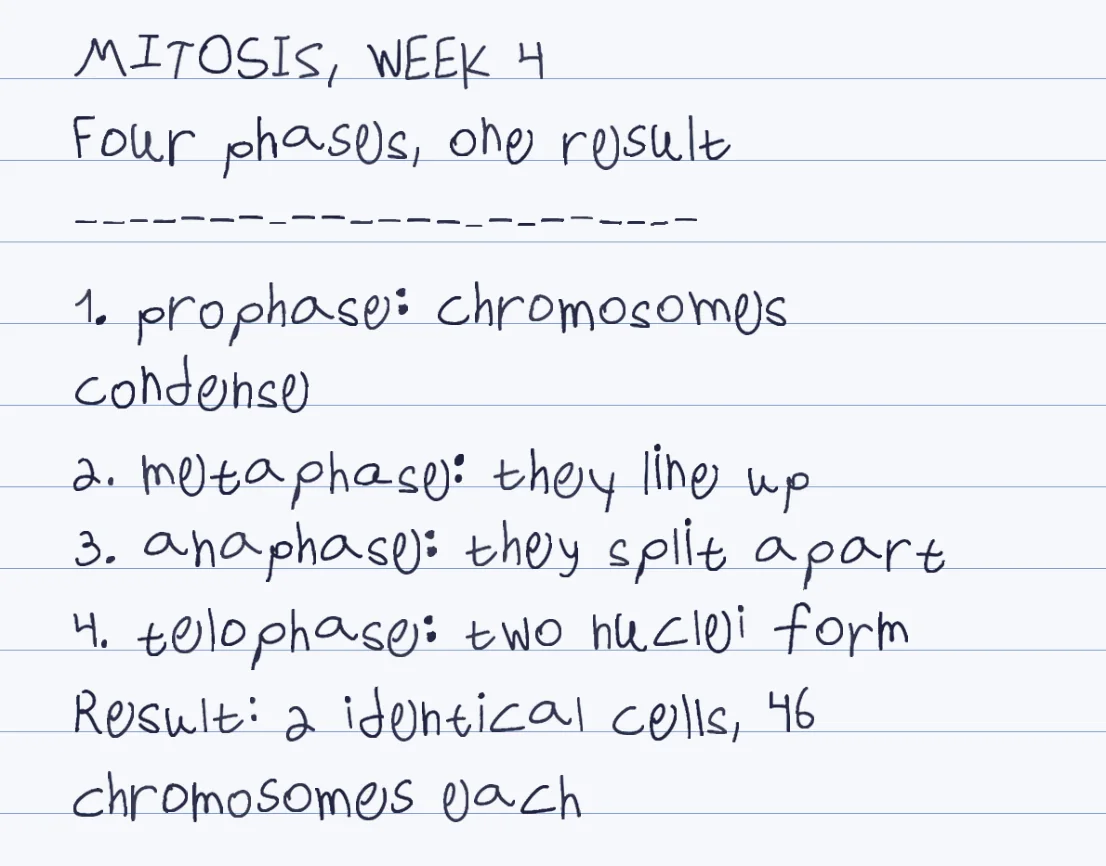
Headings in capitals
Bold and size do not carry over, so a heading in capitals on its own line is what stands out.
Hyphens for bullets
Type a hyphen at the start of a line. Numbered steps need their numbers typed, too.
About 100 words a page
At the default size. A smaller size fits more; there is a size and spacing control after rendering.
Your own hand, or a ready-made one
A ready-made hand shows the result at once. The template, 10-20 minutes in total, makes it your own.
How it works
- Put each heading, bullet and numbered step on its own line, and type the numbers and hyphens yourself
- Paste the notes into Penmark, or upload a text-layer PDF, a .docx or a .txt file
- Choose lined or grid paper and tune size and line spacing until the page looks like your notes
- Download a PDF, Word file or PNG pages and print them
Try it free, a ready-made hand and a first page in seconds
Laying out notes so they survive the conversion
The engine reads your notes line by line and writes each line in the hand you chose, wrapping when a line is too long. That is why structure has to live in the characters. Write a heading in capital letters on its own line. Start every bullet with a hyphen. Type the numbers of a numbered list yourself: if the notes came from an app that numbers automatically, the numbers are not in the text you copy.
Two things behave differently from a word processor, and we checked both on the real engine. Blank lines between paragraphs did not add vertical space in our test, and spaces at the start of a line are trimmed, so you cannot indent a sub-point. For a divider, a row of hyphens works and renders as a dashed rule. For more air between sections, raise the line spacing after rendering, which applies to the whole page.
How many notes fit on a page
At the default size about 100 words fill a page with the sample hand, and a smaller size brings that to roughly 110 to 130. In notes that is easier to picture as lines: a short bullet is one line, a longer one wraps to two, and a page holds about fifteen to twenty lines. A lecture's worth of notes, 600 words, is therefore about six pages at the default size, or five at a smaller one.
If that is more paper than you want, shrink the size a little instead of cutting content, and choose grid paper for notes with formulas, which keeps symbols aligned. You can paste up to 300,000 characters and 600 paragraphs or lines in one go.
What a handwritten page cannot hold
Everything is one ink colour for the whole document, so there are no highlighted words. Underlines, tables and diagrams are not drawn: leave a gap and sketch a diagram by hand after printing, which most people do in a real notebook anyway. Characters outside the template's 155, such as @, &, # or accented letters, are left blank, and the page lists them so you can reword.
Formulas are different: they are drawn. Fractions, roots, exponents and Greek letters come out in your hand and paste in as LaTeX, so a science or maths note works. The details are in the LaTeX to handwriting guide.
Where the notes come from, and whose hand they come out in
Paste from any notes app, or upload a Word file, PDF with a text layer or text file; the Word document guide lists what carries over from a .docx. A scanned PDF has no text to read and there is no OCR, so for a scan paste the text instead.
For people who find handwriting slow or painful, typed notes rendered in their own hand are a real accommodation: they think and type at speed, and the page that comes out is theirs. The dysgraphia page covers that case. For everyone else a ready-made hand is enough to try the result, and the template, about 10-20 minutes in total, once, makes it your own.
Questions & answers
How do I keep headings and bullets when I convert typed notes?
Put each on its own line: a heading in capitals, a hyphen at the start of a bullet, typed numbers for a numbered list. Bold, indentation and automatic numbering do not carry over.
How many typed notes fit on one handwritten page?
About 100 words at the default size with the sample hand, or about fifteen to twenty short lines. A smaller size fits roughly 110 to 130 words.
Why do my blank lines and indents disappear?
The engine writes plain lines: in our test blank lines added no vertical space and leading spaces were trimmed. Use a row of hyphens as a divider and raise the line spacing for more air.
Can I highlight or underline words?
No. The whole document is one ink colour and underlines are not drawn. Mark emphasis with capitals, or highlight by hand after printing.
Does it work for science notes with formulas?
Yes. Fractions, roots, exponents and Greek letters are drawn in handwriting, and you can paste LaTeX. Tables and diagrams are not drawn.
Can I print the handwritten notes?
Yes. Download a PDF and print at 100 percent, or choose Word or PNG pages. Choose blank paper if you are printing on real ruled paper.
Try it free, a ready-made hand and a first page in seconds
Penmark in numbers
- Price
- Free, no account
- Characters captured
- 155 in one template: Hebrew with final letters, English, digits, punctuation, math symbols and Greek
- Time to set up
- About 10-20 minutes in total, once. Or skip it: 91 ready-made hands work immediately
- Variations per character
- Three, from the three times you write each character
- Languages
- Hebrew and English in one sentence, plus math. No niqqud, Hindi, Arabic or Cyrillic
- Output
- PDF, Word (docx) or PNG on lined, grid, dotted or blank paper
- Privacy
- Uploads deleted within about 24 hours; your library stays in your browser
- Not included
- No installable font file, no tables or graphs, no OCR of scans