LaTeX to handwriting: paste the code, get a handwritten page
Most tools that claim to write math flatten it into a single line. Here the LaTeX is parsed and laid out the way you would write it in a notebook: numerator over denominator, a radical bar that stretches, limits attached to a sum. This guide is the checklist we wish every converter published: exactly which commands are drawn, which are left out, and what to type instead.
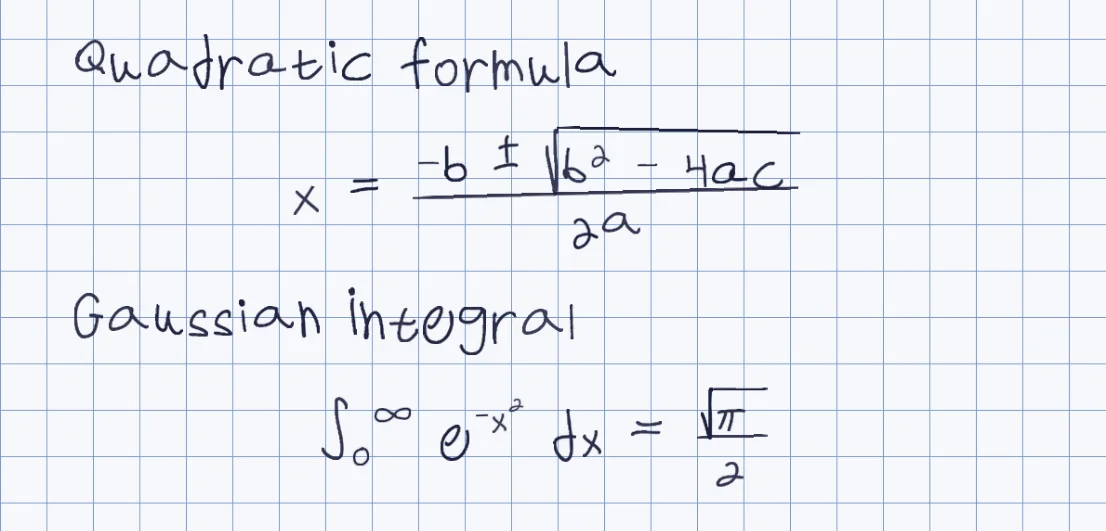
Built in two dimensions
Nested fractions, radicals with an index, sub- and superscripts, limits on sums and integrals.
A tested support list
Below is what we ran through the real parser on 22 October 2026, command by command.
It tells you what it skipped
A command it cannot draw is left out and named in a note above the preview, not hidden.
Your hand, or a ready-made one
Every symbol is drawn from the letters of the hand you picked, not pasted from a math font.
What is drawn and what is left out
| Area | Drawn in handwriting | Left out (named in a note) |
|---|---|---|
| Fractions and roots | \frac, \dfrac, \tfrac, nested fractions, \sqrt, \sqrt[n] | \binom |
| Scripts and limits | x_{i}, x^{2}, nested powers, \sum, \int and \lim with limits, primes | \prod, \oint, \iint |
| Symbols | Greek letters, \pm, \times, \div, \cdot, \approx, \neq, \leq, \geq, \infty, \partial, \nabla, \propto, arrows, \ldots, \cdots | \in, \notin, \subset, \cup, \cap, \forall, \exists, \perp, \parallel, \angle, \triangle |
| Accents and fonts | \dot and \ddot, \text{...} (kept as plain words), \left and \right (brackets at normal size, they do not stretch) | \vec, \bar, \overline, \hat, \mathbb. \mathbf and \mathrm are drawn as ordinary letters |
| Structures | pmatrix, bmatrix and vmatrix up to 15x15 | cases, tabular; align and equation keep their content but not their layout |
How it works
- Put each formula on its own line, inside $...$, $$...$$ or \[...\]
- Paste the LaTeX into Penmark and press render; try-now loads a ready-made hand with nothing to print
- Read the note above the preview: it names any command that was left out
- Rewrite those few commands (see the fixes below), then download a PDF, Word file or PNG
Try it free, a ready-made hand and a first page in seconds
What the page does with your LaTeX
Penmark reads inline math in dollar signs, display math in double dollars or \[ \], and the \( \) form that chat assistants often produce. Each formula becomes a laid-out row: a fraction has its bar stretched to the wider of numerator and denominator, a radical bar covers everything under it, limits on sums, products and integrals are written as small indices beside the symbol, and sub- and superscripts are lowered, raised and reduced. Brackets are drawn at one normal size: they do not stretch to the height of a fraction inside them. Every symbol is written in the letters of the hand you chose, so the whole page looks like one pen wrote it.
A formula inside a sentence is moved onto its own centered line: the prose before it, the formula, then the prose after it. If you want a line of text to stay one line, write the formula on its own line yourself. A plain line such as x^2 + y^2 = r^2 is recognised as a formula without any dollar signs.
What it leaves out, and the ten-second fixes
We ran a long list of commands through the parser, and the table above is the result. A command it cannot draw is dropped and named in a note, so you see the gap before you print. The most common ones have an easy rewrite.
For align or equation, put one equation per line instead. For cases, write two lines of text, each with its condition in words. For a vector, write the letter and add the arrow by hand after printing, or write the word vector. For a set, replace \in with the word in, and \mathbb{R} with R. A table or a graph is not drawn at all: leave room on the page and sketch it by hand, which most teachers expect anyway.
Two traps are not commands at all. The dollar sign is the math delimiter, so a price cannot be typed with $; write the amount in words. And the escapes \% and \& are not unescaped: type a plain % and write and in words.
Getting LaTeX out of a chat or Overleaf without losing it
From Overleaf or a .tex file you already have the source. From a chat assistant the trap is copying the rendered answer: once the chat has drawn the formula, the backslashes are gone and what you paste is not LaTeX. Ask the assistant to put its whole answer inside one code block, with one equation per line in dollar signs, and copy from the block. The homework page has the exact prompt wording built in.
Matrices, lab reports and long solutions
Matrices written as pmatrix, bmatrix or vmatrix are drawn as a real grid with stretched brackets, up to 15 by 15; a larger one is not drawn and the page says so. A lab report or a full worked solution can be pasted in one go, prose and formulas together, and tuned afterwards: size, stroke weight and spacing for the whole page, or for a single symbol that landed badly. There is a longer walk-through of that case in the handwritten lab report guide, and the broader math page is handwritten math.
Questions & answers
Can I paste LaTeX straight from Overleaf?
Yes. Paste the formulas as they are, each on its own line in $...$, $$...$$ or \[...\]. Environments such as align are left out, so split them into one equation per line first.
Which LaTeX commands are not supported?
\vec, \bar, \overline, \hat, \mathbb, \binom, \in and other set symbols, \forall and \exists, \perp and \angle, \oint and \iint, \pmod, cases and tabular. They are left out and named in a note above the preview.
Does a formula inside a sentence stay in the sentence?
No. It is moved to its own centered line, with the prose before and after it on lines of their own. For a one-line result, write the formula on its own line.
Are fractions really stacked?
Yes, in two dimensions: the bar stretches to the wider part, and nested fractions work. Roots carry their index and the radical bar covers the whole expression.
How big can a matrix be?
Up to 15x15 for pmatrix, bmatrix and vmatrix. A larger matrix is not drawn and the page notes it.
Is it in my own handwriting?
Yes, after you fill the template once (about 10-20 minutes in total); until then a ready-made hand writes it. A photo of ordinary handwriting does not work.
Can I type a dollar sign or a percent sign?
A dollar sign is the math delimiter and cannot be drawn, so write the amount in words. Type a plain % rather than \%.
Try it free, a ready-made hand and a first page in seconds
Penmark in numbers
- Price
- Free, no account
- Characters captured
- 155 in one template: Hebrew with final letters, English, digits, punctuation, math symbols and Greek
- Time to set up
- About 10-20 minutes in total, once. Or skip it: 91 ready-made hands work immediately
- Variations per character
- Three, from the three times you write each character
- Languages
- Hebrew and English in one sentence, plus math. No niqqud, Hindi, Arabic or Cyrillic
- Output
- PDF, Word (docx) or PNG on lined, grid, dotted or blank paper
- Privacy
- Uploads deleted within about 24 hours; your library stays in your browser
- Not included
- No installable font file, no tables or graphs, no OCR of scans