Hebrew handwriting font: a font file, or a page in your own hand?
A Hebrew handwriting font is easy to find and easy to install, and it is the right answer when you want to keep typing in Word or Canva. It is the wrong answer when the page has to look as if a person wrote it, because every letter repeats the same shape. This guide separates the two jobs and says what Penmark does for Hebrew, including what it does not.
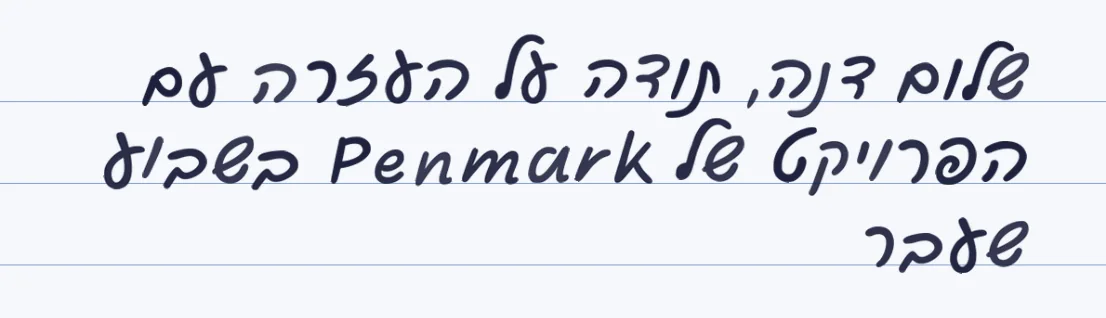
A font types live
Install it and type in Word or Canva. The trade: one fixed shape per letter, so it looks printed.
Penmark writes pages
Type or paste Hebrew, get a PDF, Word file or PNG. There is no font file to install.
13 Hebrew hands, ready
Thirteen of the ready-made hands include Hebrew letters, among them a genuine human Hebrew hand.
Or your own Hebrew hand
Fill one template, about 10-20 minutes in total, and the pages come out in your letters.
How it works
- Decide the job: live typing in an app needs a font file, finished pages need a page maker
- For pages: open Penmark and pick one of the ready-made Hebrew hands, or load your own
- Type or paste the Hebrew, with English words and numbers where you need them, and choose the paper
- Download a PDF, Word file or PNG and print or send it
Try it free, a ready-made Hebrew hand and a first page in seconds
What a Hebrew handwriting font gives you, and what it cannot
A font is a file of letter shapes, one per character. Install it and every program on your computer can type in it, which is exactly what you want for a poster in Canva or a birthday card in Word. The same property is the limit: a font cannot change a letter from one occurrence to the next, so a page set in it reads as typeset text in a handwriting style. In Hebrew this shows even faster, because a few common letters, the vav, the yod and the final letters, repeat all through a sentence.
There are good free Hebrew handwriting fonts. Several are published on Google Fonts under an open licence, and the Culmus project publishes more. Always read the licence before you use one on something you sell. If a font is what you need, take one of those, and use the rest of this page only if you also need pages that look written.
Pages in Hebrew handwriting, without a font file
Penmark does the other job. You type or paste Hebrew, and the engine writes the page: right to left, with the five final letters in place, English words and numbers inside the same sentence and in their own direction, on lined, grid, dotted or blank paper. The ready-made collection has 13 hands with Hebrew letters, four from Google Fonts and nine from the Culmus project, and the sample hand is a real captured human hand that also writes Hebrew.
To have the pages in your own Hebrew handwriting, fill one template with a dark pen. It captures 155 characters, the 27 Hebrew letter forms among them, three times each, so the engine can alternate between variations. Plan on about 10-20 minutes in total, once. After that every page takes seconds, and the library stays in your browser.
What to know about final letters, English words and niqqud
Final letters are separate characters in the template, captured separately and written where you typed them. The engine writes what you typed: it does not correct a regular letter at the end of a word. An English name or number inside a Hebrew sentence keeps its own direction, but punctuation right after an English word can land on the far side of it, which is how right-to-left text works everywhere, so check that spot in the preview.
There is no niqqud. The template covers letters, digits and punctuation, not vowel marks, so vowelised text is written without them. Other scripts, Arabic and Cyrillic for example, are not covered either. For letters, forms, assignments and cards, plain Hebrew is what people need.
Which route for which job
Choose a font file for live typing in Word or Canva, a poster or a menu, anything you will keep editing. Choose finished pages for an assignment, a letter, a card or a recipe, anything that should look written. If you want your own Hebrew handwriting as an installable font, a font maker is the right tool, and the Calligraphr comparison notes that its public pages do not mention Hebrew, so test before paying. For the Hebrew learner's side of the story, see Hebrew handwriting for learners, and for Word documents, Word document to handwriting.
Questions & answers
Is there a free Hebrew handwriting font?
Yes. Several are on Google Fonts under an open licence and more come from the Culmus project. Check the licence before commercial use. Penmark's ready-made collection draws on both, but it writes pages and does not give you a font file.
Can I use a Hebrew handwriting font in Canva or Word?
Yes, if you install a font file. Penmark does not produce one: it makes finished pages (PDF, Word or PNG), which you can place in Canva or Word as pictures.
How many Hebrew hands does Penmark have?
Thirteen of the ready-made hands include Hebrew letters, and the sample hand, a real captured hand, writes Hebrew too. You can also capture your own Hebrew handwriting from one template.
Does it handle final letters and English inside Hebrew?
Yes. The five final letters are captured separately and written as typed, and English words and numbers keep their own direction inside the Hebrew line. It writes what you type, so it does not correct a wrong final form.
Does it support niqqud?
No. The template covers letters, digits and punctuation without vowel marks, so vowelised text is written without them.
Can I make my own Hebrew handwriting into a font?
Penmark keeps your Hebrew handwriting as a private library and writes documents from it, not a font file. For an installable font, use a font maker and test its Hebrew support first.
Try it free, a ready-made Hebrew hand and a first page in seconds
Penmark in numbers
- Price
- Free, no account
- Characters captured
- 155 in one template: Hebrew with final letters, English, digits, punctuation, math symbols and Greek
- Time to set up
- About 10-20 minutes in total, once. Or skip it: 91 ready-made hands work immediately
- Variations per character
- Three, from the three times you write each character
- Languages
- Hebrew and English in one sentence, plus math. No niqqud, Hindi, Arabic or Cyrillic
- Output
- PDF, Word (docx) or PNG on lined, grid, dotted or blank paper
- Privacy
- Uploads deleted within about 24 hours; your library stays in your browser
- Not included
- No installable font file, no tables or graphs, no OCR of scans