Fonts that look like real handwriting: why most look fake, and what fixes it
You find a handwriting font that looks lovely in the preview, type a sentence, and it looks printed. It is not your imagination, and it is not the font's design: it is how a font works. Here are the tells the eye catches within a second, what fixes each, and the honest limits of anything that renders handwriting on a screen.
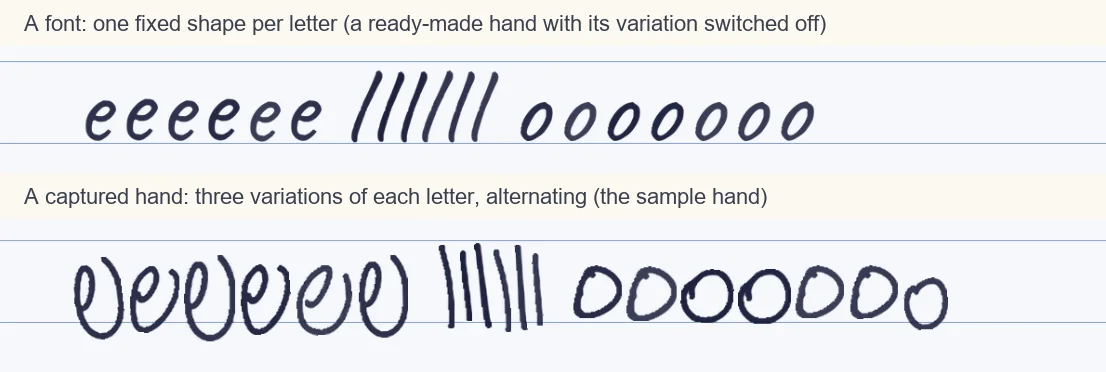
Repeated letters give it away
ll, ee, oo and tt: the eye checks double letters first, and in a font they are twins.
A ruler-straight baseline
Real writing wanders a little above and below the line. A font sits dead level.
Machine-even spacing
Every gap is the same, every line is the same length, and the margin is perfectly justified.
One ink weight everywhere
A pen presses harder on some strokes. A font draws every stroke at the same weight.
The tells, and what each source does about them
| The tell | An ordinary font | A captured hand with alternation |
|---|---|---|
| The same letter twice in a word | Identical shape every time | Alternates between 3 captured variations |
| Size and slope | Fixed | Small random changes from letter to letter |
| Baseline | Perfectly level | Small shifts above and below the line |
| Spacing | Mathematically even | Adjustable word and letter spacing, per page or per letter |
| Pressure and ink weight | Uniform | Still uniform: the same limit, in both |
| Joins between letters in cursive | Only if the font has joined shapes | Not captured: each letter is written in its own box |
How it works
- Pick a hand with real variation: your own captured letters, or a font that ships alternates your app applies
- Let size, slope and baseline vary a little from letter to letter instead of staying fixed
- Loosen the layout: ragged right edge, uneven spaces, slightly different line gaps
- Print on real ruled paper in blue or black ink, then read the repeated words and double letters in the result
Try it free, a ready-made hand and a first page in seconds
What the eye catches first
Reading is pattern matching, and so is spotting a fake. The cheapest test is a repeated letter: write the word little by hand and the three l's differ, type it in a font and they are identical. The same goes for words that recur, the and and, and for double letters. A font passes the single-letter test and fails the moment any letter appears twice on a page, which is every page.
That is why the figure above uses a line of the same letters. In a font the second e is a copy of the first. In a hand that was captured with several variations, the engine can pick a different one for the next occurrence, so the line reads as written.
Why a font cannot fix this by itself
A font stores one outline for each character. To get a second shape for the same letter, a font has to be designed with alternates and the app has to apply them: OpenType contextual alternates and stylistic sets can rotate a few shapes automatically, and some handwriting fonts use them. But every extra alternate is more design work for every letter, so most fonts carry few of them, and apps differ in whether they switch the feature on. Check your font's samples and your app before you rely on it.
Variation is also not enough on its own. Real writing drifts: the size, slant and baseline of consecutive letters change by a small, random amount. Adding that randomness to a repeated shape helps and is cheap, but it cannot invent the genuinely different forms that a hand produces when it writes the same letter three times.
What captured variation does, and a ready-made hand does not
When you fill the template, you write each character three times. The engine keeps all three, alternates between them as it writes, and adds a small change of size and slope on top. That is the whole trick, and it is why a repeated word does not look stamped. The ready-made hands in Penmark are built from fonts, so they have the size and slope changes but one underlying shape per letter, which is the honest reason your own hand looks more alive than a ready-made one.
You can steer the rest by hand after rendering: size, stroke weight, line spacing and word spacing for the whole page, or for one letter that landed badly. Set the text ragged-right and let some lines be a little longer than others, because a perfectly even column is another tell.
Where a rendered page is still not a pen
Three honest limits, whichever tool you use. There is no pressure: every stroke has the same weight, where a real pen swells and thins. There is no fatigue: a very long document looks more even than a hand that tires over ten pages. And joins are missing: each letter is captured in its own box, so a flowing cursive hand is written as separate letters set close together, and a print or semi-print hand is the best fit.
None of this makes a rendered page worthless; it makes it a rendering. Printed on ruled paper at a slightly loose size, it reads as handwriting at a normal reading distance, which is the goal for most uses. The text-to-handwriting page goes through the converter itself: text to handwriting.
Questions & answers
Why do handwriting fonts look fake?
Because a font stores one shape for each character, so every occurrence of a letter is identical. Real handwriting differs every time you write the same letter, and the eye notices the repetition immediately, especially in double letters.
Are there handwriting fonts that look real?
Some include OpenType contextual alternates that rotate a few shapes, which helps, but apps differ in whether they apply them, and most fonts carry only a few alternates. A hand captured with several variations per letter does it more fully.
What makes writing look handwritten on a screen?
Variation between occurrences of the same letter, small random changes in size, slope and baseline, uneven spacing, and a ragged layout. Printing on real ruled paper in blue or black ink helps too.
Does Penmark fix the stamped look?
Largely, with your own hand: three captured variations of each character alternate, with small changes of size and slope on top. The ready-made hands are built from fonts, so they have the size and slope changes but one shape per letter.
What does a rendered page still lack compared with a real pen?
Pressure variation, the drift of a hand that tires over many pages, and the joins between letters in cursive. Each letter is captured in its own box.
Can I make my own handwriting into a font that looks real?
A font made from your handwriting still repeats one shape per letter unless it ships alternates. Penmark does not make a font file; it writes finished pages from your captured letters.
Try it free, a ready-made hand and a first page in seconds
Penmark in numbers
- Price
- Free, no account
- Characters captured
- 155 in one template: Hebrew with final letters, English, digits, punctuation, math symbols and Greek
- Time to set up
- About 10-20 minutes in total, once. Or skip it: 91 ready-made hands work immediately
- Variations per character
- Three, from the three times you write each character
- Languages
- Hebrew and English in one sentence, plus math. No niqqud, Hindi, Arabic or Cyrillic
- Output
- PDF, Word (docx) or PNG on lined, grid, dotted or blank paper
- Privacy
- Uploads deleted within about 24 hours; your library stays in your browser
- Not included
- No installable font file, no tables or graphs, no OCR of scans