Handwriting font from a photo: why a plain photo fails, and what works
People search for a handwriting font generator that works from an image, hoping to snap a page of notes and get their own writing back. A photo of ordinary handwriting does not turn into a font or a handwriting library, and the reason is worth understanding because it is the most common way an upload fails. Here is why, and the version that does work.
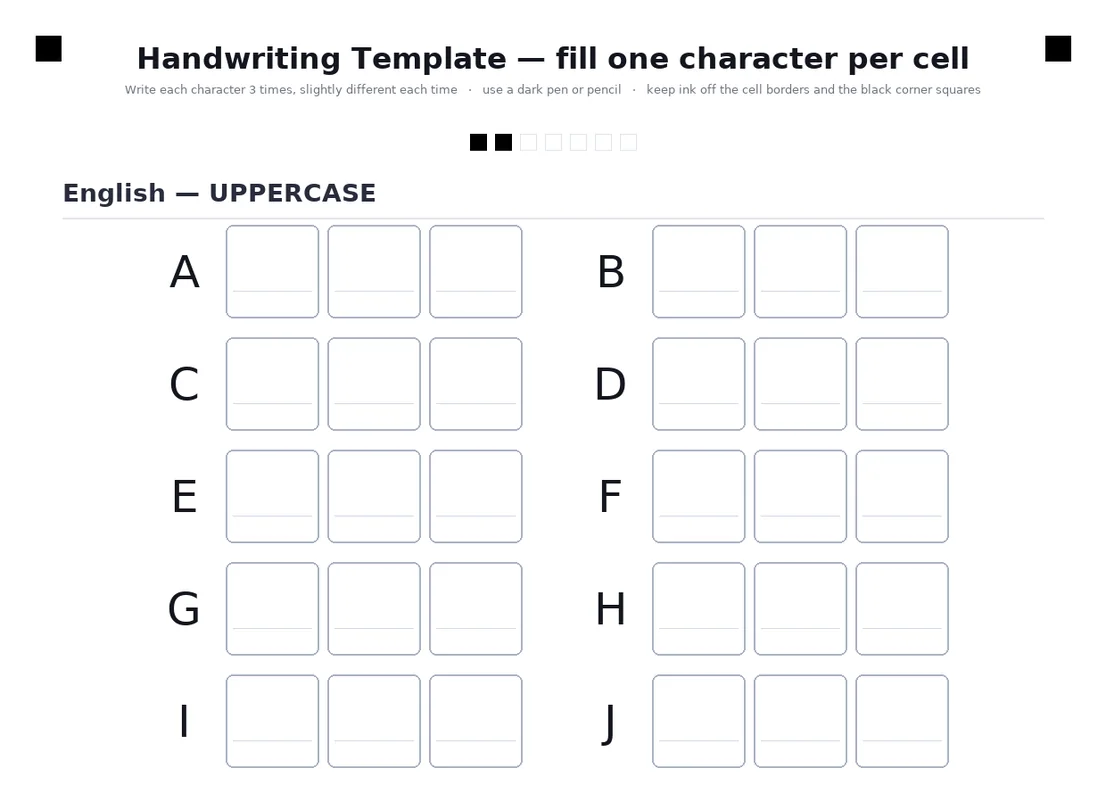
A box says which letter it is
Each box is labelled by its position, so a mark inside is that character, with no guessing.
Three copies of each
Writing every character three times gives the variation that stops a repeated letter looking stamped.
Photograph it flat
From straight above, all four black corner squares in the frame, with no shadow, finger or glare on them.
10-20 minutes in total
Print, fill with a dark pen, photograph, upload. Once, and the library stays in your browser.
A photo of your notebook, or the filled template
| The question | A photo of a notebook page | The filled template |
|---|---|---|
| Does the tool know which character each mark is? | No. It would have to read your handwriting first, and joined or touching letters make that unreliable | Yes. Each box is one known character |
| How many clean copies of each letter? | Whatever the sentence happened to contain, often none of q, z or a capital X | Three of each of the template's characters |
| Digits, final letters, punctuation, math symbols | Only if your sentence used them | Every one has its own boxes |
| Where is the page, how is it tilted? | Unknown: curved paper, ruled lines in the way | Four black corner squares give the position and angle |
| What you get | A guess at your style | Your own letters |
How it works
- Print the template (the English-only one is 7 sheets, the Hebrew and English one is 9 pages)
- Fill every cell with a dark pen, black or blue, three times for each character
- Photograph or scan each page flat, with all four black corner squares in the frame
- Upload the photos, whole or in parts: every page is recognised automatically, in any order
Try it free, a ready-made hand and a first page in seconds
Why a photo of ordinary handwriting does not work
To reuse your handwriting, a tool has to cut it into letters and know which letter each cut is. In a photo of a sentence the letters touch, slant into each other and sit on whatever lines the paper has, so the cutting is a guess, and the naming of each piece is a second guess. Even if both go well, the sentence only contains the letters you happened to use: no q, no capital X, no question mark, and certainly no final nun.
Both font makers we compared, Calligraphr and YourFonts, start from a filled template for the same reason, and so does Penmark. Asking for a photo of ordinary handwriting instead is the single most common reason a Penmark upload fails: it is why the site says, in so many words, that a photo of your regular handwriting will not work.
What the template does that a photo cannot
The template is a printed form with one box per character, and each box has a known meaning. A mark inside the box labelled a is an a. Four black squares in the corners tell the engine exactly where the page is and how it is tilted, so every box can be found even in a phone photo taken at a slight angle. And because each character gets three boxes, the engine ends up with three variations of each, which is what lets a repeated letter come out different the second time.
The full template covers 155 characters over 9 pages: Hebrew with its final letters, English, digits, punctuation, math symbols and Greek. The English-only version is 7 pages and covers 128. You can fill only the pages you need: a character whose boxes are empty is simply not in your library, and is borrowed from a ready-made hand until you add it.
How to photograph it so it reads the first time
Lay the sheet on a darker surface and shoot from straight above, the whole page in the frame with all four black corner squares visible. Use daylight or a lamp with no shadow across the page. Do not use the flash: it washes out the ink, and the strokes should look black in the picture. Keep fingers, glare and creases off the corner squares. A scan from a flatbed scanner is the easiest of all.
Fill the boxes with a dark pen, black or blue, and keep the ink inside the box and off its border. Send the photo at your phone's normal quality: a regular phone photo is 2 to 5 MB, and RAW or maximum-resolution files can be too large to read. You can upload up to 30 files at once, 64 MB in total, as PDF or images, and in parts, in any order.
If a page does not read
The site says what went wrong in plain words. No page found means the photo was not of the template, or the whole sheet was not in the frame. No corners means the four black squares did not come out: retake it without shadow or glare. Too dark means more light, and washed out means no flash and darker ink.
If only some pages were read, the page tells you which are missing and how many characters are still not in your library, and borrows those from a built-in hand in the meantime. Photograph just the missing page and upload it again; you do not redo the others.
A library, not a font file
What you get from the template is a private library of your letters, kept in your browser, which writes finished documents: PDF, Word or PNG, Hebrew and English together, with math. It is not an installable font file. If a font file is what you need, a font maker such as Calligraphr or YourFonts is the right tool, and it starts from a template too; see the Calligraphr comparison and the guide to typing in your own handwriting.
Questions & answers
Can I make a handwriting font from a photo of my handwriting?
Not from a photo of ordinary handwriting. A tool needs to know which character each mark is and to see several clean copies of it. A printed template with one labelled box per character gives it that, and a photo of the filled template works.
Why does my upload say it could not find a page?
Usually because the photo is of a notebook or letter instead of the printed template, or because the whole sheet with all four black corner squares was not in the frame. Photograph the filled template from straight above.
Can I scan the template instead of photographing it?
Yes. A scan, as PDF or image, is the easiest to read. Upload it the same way.
How many pages do I have to fill in?
The Hebrew and English template is 9 pages (155 characters) and the English-only one is 7 pages. You can upload only the pages you need; characters whose boxes are empty are borrowed from a ready-made hand until you add them.
How big can the upload be?
Up to 30 files at once and 64 MB in total. A normal phone photo is 2 to 5 MB. Photos with too many pixels, such as RAW or maximum-resolution files, are better sent at the phone's normal quality.
Will I get a font file I can install?
No. Penmark keeps your letters as a private library in your browser and writes finished documents from it. For an installable font use a font maker, which also starts from a filled template.
How long does it take?
About 10-20 minutes in total, once: print, fill with a dark pen, photograph, upload. After that every page takes seconds.
Try it free, a ready-made hand and a first page in seconds
Penmark in numbers
- Price
- Free, no account
- Characters captured
- 155 in one template: Hebrew with final letters, English, digits, punctuation, math symbols and Greek
- Time to set up
- About 10-20 minutes in total, once. Or skip it: 91 ready-made hands work immediately
- Variations per character
- Three, from the three times you write each character
- Languages
- Hebrew and English in one sentence, plus math. No niqqud, Hindi, Arabic or Cyrillic
- Output
- PDF, Word (docx) or PNG on lined, grid, dotted or blank paper
- Privacy
- Uploads deleted within about 24 hours; your library stays in your browser
- Not included
- No installable font file, no tables or graphs, no OCR of scans