Handwritten letter generator: type the letter, get it in handwriting
A letter in someone's own hand is read differently from a typed one, and most of us cannot write a page without crossing out. A letter generator closes the gap: you type the letter, and a page comes out in handwriting. It is worth knowing exactly what it generates, because the answer is not what the name suggests.
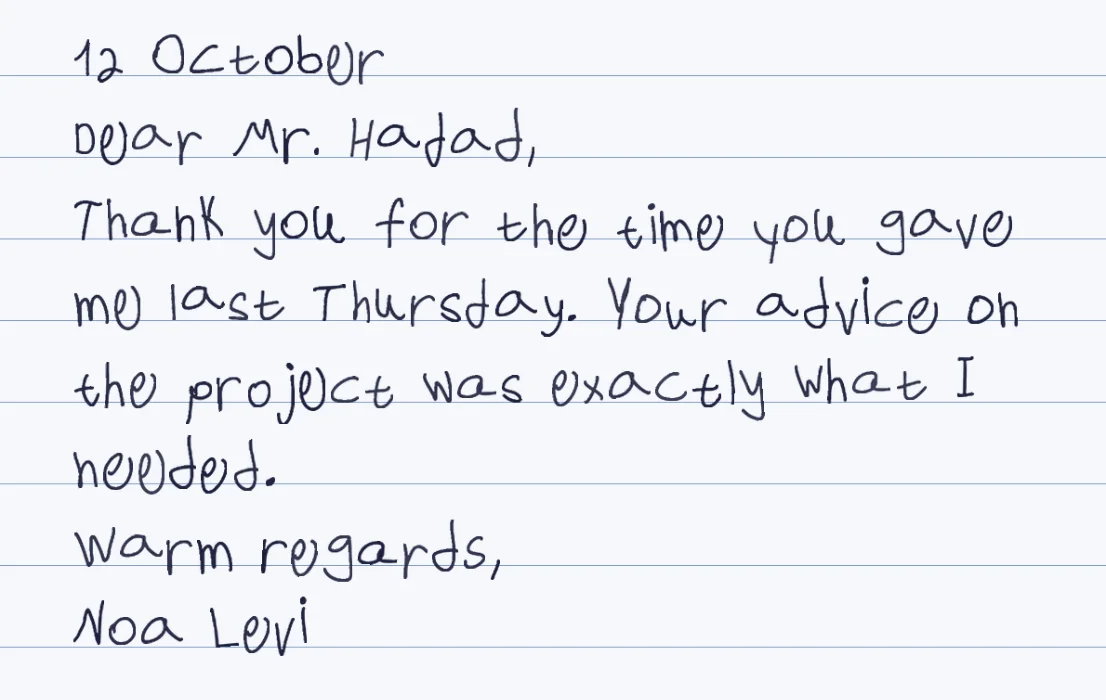
It renders, it does not compose
You write the letter. The generator writes it out in handwriting, with variation between letters.
Ready-made or your own hand
A ready-made hand works now. For a letter to someone who knows your writing, fill the template once.
Print it or send it
PDF to print on good paper, a Word file of page images, or PNG pages to message.
Mind the limits
Accented letters and the characters @, &, # and $ are not drawn, so check names and addresses.
How it works
- Type the letter with the date, greeting, body, closing and name each on its own line
- Paste it into Penmark, choose a ready-made hand or load your own, and pick the paper
- Check the preview, including names, and tune size and line spacing so the page is comfortably full
- Download a PDF, Word file or PNG, then print or send it
Try it free, a ready-made hand and a first page in seconds
What a letter generator does, and what it does not
The word generator suggests that the tool composes the letter. This one does not: it takes the words you typed and renders them in handwriting, the way you would write them with a pen. That is what you want for a letter that has to sound like you, and it is also why the hard part, saying the thing, stays with you. If you use an assistant to help you draft, paste the final text in. Penmark never changes your words.
What it gives you is the physical impression: a page with the variation of a real hand, on blank, lined or grid paper, in blue or black ink, Hebrew and English in one letter if you want. A ready-made hand shows the result in seconds. For a letter to someone who knows your writing, fill the template once, about 10-20 minutes in total, and the letter comes out in your own letters.
A layout that renders well
Type each part of the letter on its own line: the date, the greeting, the body, the closing, the name. The engine writes plain lines, and in our test blank lines did not add space and leading spaces were trimmed, so the shape of a letter comes from line breaks, not from spacing. The body wraps by itself. If the page looks cramped, raise the line spacing after rendering, and a slightly smaller size gives a roomier margin on the right.
About 100 words fill a page at the default size. A letter of 250 words runs to about two and a half pages, so either accept the second page or reduce the size; a short note of 60 to 80 words sits comfortably on one page and looks good on blank paper.
Names, addresses and the characters that are not drawn
The template holds 155 characters and nothing outside them is drawn. For letters the ones that matter are accented letters and four symbols. A name such as José or Zoë has a letter the template does not hold, and it is left blank, so check names in the preview. An @ in an email address, an & in a company name, a # in an address and a $ before an amount are all left blank too; the page lists what it skipped. Write the amount in words, spell out and, and put the email address in your own words or add it by hand.
Hebrew is fully supported, with final letters, right-to-left order and English words inside the sentence. Typographic quotes and dashes in your draft turn into plain ones on their own.
Printing and sending
A PDF prints at 100 percent on a good paper: choose blank if the paper is already ruled. Download PNG pages instead if you would rather send the letter as pictures in a message. There is no envelope generator: write the address by hand, or render it as lines on a blank page and print it on a label. For wording, the guides for a handwritten cover letter and a customer thank-you note cover those two cases.
If the letter is for a family keepsake, the keepsake page covers capturing a parent's or grandparent's handwriting, so that new letters can be written in it.
Questions & answers
Does the generator write the letter for me?
No. It renders the letter you type as a page in handwriting. If you want help drafting, write or edit the words first, then paste the final text.
Can the letter be in my own handwriting?
Yes. Fill the template once (about 10-20 minutes in total) and every letter after that comes out in your own letters. A ready-made hand works immediately.
Why is a letter in my name or address blank?
Accented letters such as é or ë and the characters @, &, # and $ are outside the 155 the template holds and are left blank. The page lists them so you can reword.
How long a letter fits on a page?
About 100 words at the default size, so a 250-word letter is roughly two and a half pages. A smaller size fits more.
Can I print the letter on my own paper?
Yes. Download the PDF and print at 100 percent. Choose blank paper in the tool if your paper is already ruled.
Is there a fee or an account?
No. It is free, with no account and no per-page charge.
Try it free, a ready-made hand and a first page in seconds
Penmark in numbers
- Price
- Free, no account
- Characters captured
- 155 in one template: Hebrew with final letters, English, digits, punctuation, math symbols and Greek
- Time to set up
- About 10-20 minutes in total, once. Or skip it: 91 ready-made hands work immediately
- Variations per character
- Three, from the three times you write each character
- Languages
- Hebrew and English in one sentence, plus math. No niqqud, Hindi, Arabic or Cyrillic
- Output
- PDF, Word (docx) or PNG on lined, grid, dotted or blank paper
- Privacy
- Uploads deleted within about 24 hours; your library stays in your browser
- Not included
- No installable font file, no tables or graphs, no OCR of scans