Holiday cards in your own handwriting, without writing fifty of them
Fifty holiday cards by hand is a weekend, and by card forty the writing gets small and tired. A printed message looks printed. Penmark sits in between: you type the message once, it comes out in your own handwriting, and you change the name at the top for each card. You print at home and sign each one yourself.
Try it free, a ready-made hand and a first card in secondsLanguages, no fine print: Penmark writes the Latin letters a-z without accents (so English, Indonesian and Tagalog are written in full), Hebrew without niqqud, digits and math. It does not write Devanagari (Hindi, Marathi, Nepali), Arabic or Urdu script, Cyrillic (Russian, Ukrainian), or accented Latin letters such as á, ñ, ü, ç and ş. In Spanish, Turkish, German or French text those letters are left out, and the tool lists which ones.
Write the message once
Type it one time. For each card, change the greeting line and render again: a page takes seconds.
In your own handwriting
Fill one template and every card is written in your letters, three variations of each, so a repeated letter never looks stamped.
Printed at home
Download a PDF or PNG and print it on card stock or plain paper. Sign each card yourself.
Free, no per-card fee
Fifty cards or five hundred, it costs nothing. No account, no subscription.
How it works
- Open Penmark and pick a ready-made hand, or fill the English template once with a dark pen so the cards are in your own handwriting (about 10-20 minutes in total)
- Type the message with each part on its own line: the greeting, two or three sentences, the closing and your names
- Choose blank paper and a blue or black ink, then check the preview and tune the size until the message fills the card area
- Download the PDF or PNG, change the name in the greeting, and download again for the next card
- Print on card stock and trim, or print on plain paper and fold it into the card, then sign each one by hand
Try it free, a ready-made hand and a first card in seconds
Why not just type the cards, or pay a robot pen
A typed or printed holiday letter is fine for the annual family update, but a card is read for the handwriting. People notice a printed message, and many still treat it as less personal. Writing every card by hand is the real thing, and also the reason the box of cards is still on the table on December 20th.
Robot pen services solve this for money: a pen machine writes each card with a real pen and they mail it for you, which is worth paying for if you send hundreds of business cards. For a family list of forty or fifty, Penmark does the writing part for free and leaves the printing, the stamps and the signature with you.
What a card page looks like, and how to make fifty
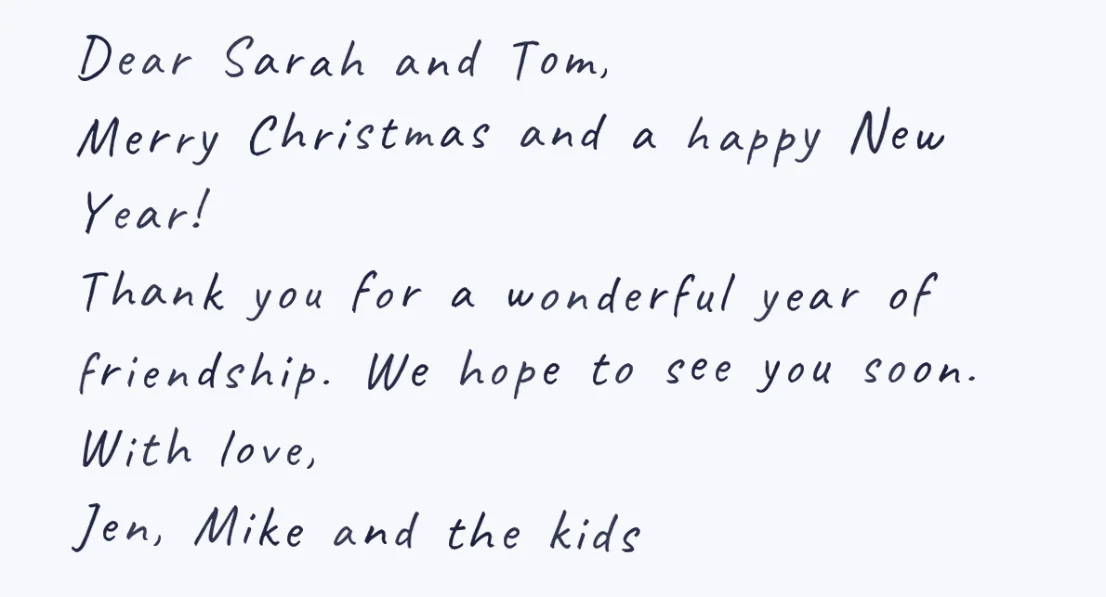
Type the card the way you would write it: the greeting on the first line, the message, then the closing and the names on their own lines. About 100 words fill a full page at the default size, and a card message is usually 30 to 60, so raise the size until the message fills the area you will print. Blank paper looks like a card; lined paper looks like a letter.
There is no automatic mail merge. For a personal greeting on each card, change the name on the first line and render again; with a ready-made hand or your own library loaded, that takes a few seconds per card. If one message works for everyone (Dear friends, Dear neighbors), render it once and print as many copies as you need. Copies of the same text come out identical, like printed copies, so a name line is what makes each card its own. Inside a card written in your own hand, a repeated letter comes from a different captured variation, so the message does not look stamped.
Your own handwriting, or a ready-made one
For cards to people who know your writing, use your own hand: print the English template (7 pages, 128 characters), write each character three times with a dark pen, photograph each page from above and upload it. That takes about 10-20 minutes in total, once, and it is the step that needs a printer. If you are on a phone, start with a ready-made hand now and fill the template later on a computer.
The 90 ready-made hands work the moment the page opens, with no template, which is the fastest way to see how a card will look. The example above is one of them. For invitations with designed backgrounds there is a separate invitation designer, and for one long letter, the handwritten letters page covers layout and length.
What it cannot write
The template holds 155 characters, so a few things on a card need rewording. There is no ampersand, so write Jen and Mike, not Jen with an ampersand. Accented letters such as the e in Noel or the n in a Spanish name are left blank and listed, so check names in the preview. Emoji and symbols such as a heart or a star are not drawn either. Typographic quotes and apostrophes are turned into plain ones by themselves.
Questions & answers
Is there a website that prints my holiday cards in my own handwriting?
Penmark writes them in your own handwriting for free, and you print them at home. Fill one pen template once (about 10-20 minutes in total), type the message, and download a PDF or PNG for each card. It does not print or mail the cards for you.
Can I put a different name on each card?
Yes, one at a time: change the name on the greeting line and render again, which takes seconds. There is no automatic mail merge from a contact list.
Do I need a printer?
To print the cards, yes, or a print shop. Your own handwriting also starts with a printed template. A ready-made hand needs no template, so you can try it from a phone.
Can I write Merry Christmas and Happy Hanukkah in the same batch?
Yes. Each render is its own text, so write a Christmas message, a Hanukkah message or Happy Holidays, whatever each card needs. Hebrew is supported too.
How much does it cost?
Nothing. There is no account, no per-card fee and no limit on how many cards you render.
Will the cards look identical?
Cards with exactly the same text come out identical, like printed copies. Change the name or one line and that card is drawn again for its own text. Inside each card written in your own hand, repeated letters differ, because the engine alternates between the three variations you wrote.
Try it free, a ready-made hand and a first card in seconds
Penmark in numbers
- Price
- Free, no account
- Characters captured
- 155 in one template: Hebrew with final letters, English, digits, punctuation, math symbols and Greek
- Time to set up
- About 10-20 minutes in total, once. Or skip it: 90 ready-made hands work immediately
- Variations per character
- Three, from the three times you write each character
- Languages
- Hebrew and English in one sentence, plus math, and any language written in plain a-z (Indonesian, Tagalog). No niqqud, Hindi, Arabic, Cyrillic or accented letters
- Output
- PDF, Word (docx) or PNG on lined, grid, dotted or blank paper
- Privacy
- Library saved in your browser for reuse; the server's copy is deleted with your uploads within about 24 hours
- Not included
- No installable font file, no tables or graphs, no OCR of scans